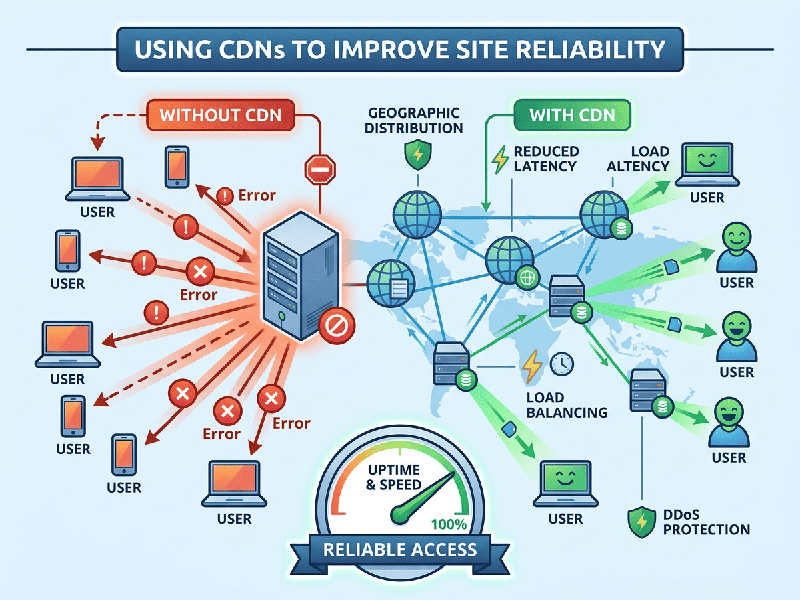
Using CDNs to Improve Site Reliability
Using a Content Delivery Network (CDN) is one of the most
effective strategies for an SMB to improve site reliability, speed, and
security. By caching content on a distributed network of servers (Points of
Presence or PoPs) globally, you offload traffic from your origin server and
ensure your site remains available even under stress.
How CDNs Enhance Reliability
- Traffic Offloading &
Scalability: A
CDN serves static content (images, CSS, JavaScript) from edge servers
close to the user. This reduces the load on your origin server, preventing
it from crashing during traffic spikes.
- DDoS Mitigation: Reputable CDN providers have
massive bandwidth capacity designed to absorb and deflect Distributed
Denial of Service (DDoS) attacks before they reach your infrastructure.
- High Availability &
Failover: If
your origin server experiences downtime, many CDNs can serve cached
versions of your site (or a custom "maintenance" page), ensuring
users don't see a "Connection Refused" error.
- Latency Reduction: By serving content from the
closest geographical location, you minimize the "hops" data
takes, resulting in faster load times which correlates directly with
better user retention.
Strategic Implementation for SMBs
To maximize the reliability benefits of a CDN, focus on these
three areas:
1.
Cache Configuration (Cache-Control):
o Set appropriate Time-To-Live (TTL)
headers. Static assets like logos or site architecture should have long cache
durations, while dynamic pages should have shorter TTLs or be bypassed
entirely.
2.
Origin Shielding:
o Use an "Origin Shield" or
"Tiered Caching." This adds a secondary layer of caching between your
origin server and the CDN edge, ensuring that only one request for a specific
file reaches your server even if hundreds of edge servers need to fetch it.
3.
Automatic Purging & Versioning:
o When you update your site, ensure
your CDN is configured to purge old caches automatically (via API or
dashboard). Implementing Cache Busting (e.g., adding ?v=1.1 to file
names) is a best practice to ensure users get the latest version immediately.