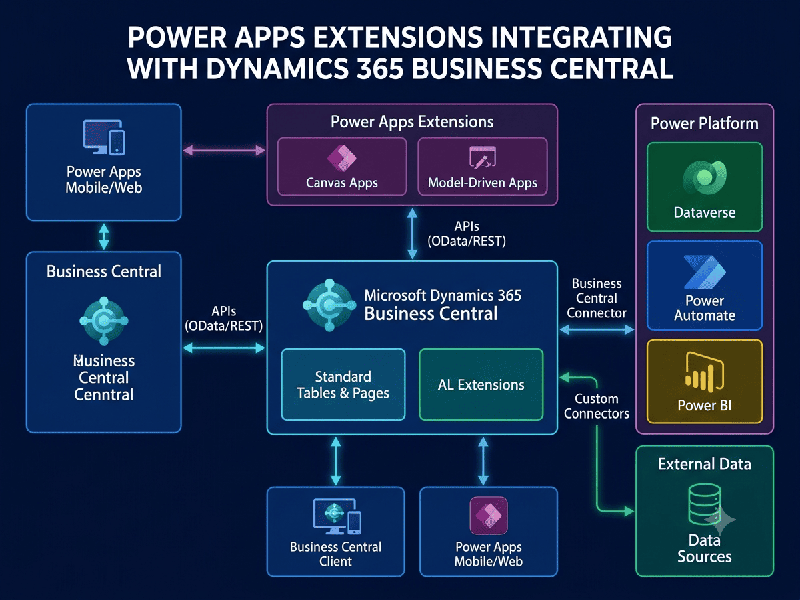
Power Apps Extensions for Business Central
Extending Microsoft Dynamics 365 Business Central
using Power Apps allows organizations to build tailored mobile or web
interfaces without modifying core AL code. It bridges the gap between
back-office accounting/ERP workflows and role-specific tasks on the shop floor,
in the warehouse, or out in the field.
Key Architectural Approaches
When extending Business Central with Power Apps, you
typically use one of two main app paradigms:
1. Canvas Apps (Task-Focused & Custom UI)
What it is: A pixel-perfect, custom drag-and-drop interface optimized
for mobile phones or tablets.
Connection Method: Connects directly to Business Central using the native
Business Central Connector (via exposed API Pages / OData Web Services) or
through Microsoft Dataverse.
Best Used For: Simple, single-purpose apps designed for non-ERP users—such
as barcoding/scanning items, submitting field service logs, or capturing photos
for quality control.
2. Model-Driven Apps (Data-Centric & Complex
Workflows)
What it is: A component-driven layout based on the underlying data
model.
Connection Method: Requires Dataverse Virtual Tables or Dataverse
Synchronization enabled via Business Central's native Dataverse
integration.
Best Used For: Enterprise processes requiring complex relational data,
multi-stage business process flows, or seamless integration with Dynamics 365
Sales/Field Service.
Data Integration Methods
To exchange data between Power Apps and Business
Central, developers rely on three main data access paths:
Standard Business Central Connector (APIs):
Uses standard API endpoints out of the box (e.g.,
customers, vendors, salesOrders).
Perform CRUD (Create, Read, Update, Delete) operations
directly in real time.
Custom AL APIs (Custom Page/Query Objects):
When standard APIs don't cover custom AL fields or
tables, developers write a lightweight AL API page in Business Central to
expose those fields to Power Apps.
Dataverse Virtual Tables:
Exposes Business Central tables inside Microsoft
Dataverse as "virtual" entities without duplicating or storing data
twice.
Enables deep Power Platform capabilities (Model-Driven
Apps, Power Pages, Power Automate flows) directly on BC data.
Embedded Experience: Power Apps Inside Business
Central
Instead of directing users to a separate browser tab
or mobile app, Power Apps can be embedded directly onto Business Central
pages.
FactBox Embedding: Add a Power App as a side panel (FactBox) on
Customer, Item, or Vendor cards to display supplementary data (e.g., displaying
external shipping tracking maps or CRM notes).
Card & List Integration: Embed custom interactive forms
directly onto standard Business Central pages to extend standard UI
capabilities.