Offline-Ready Mobile Architecture
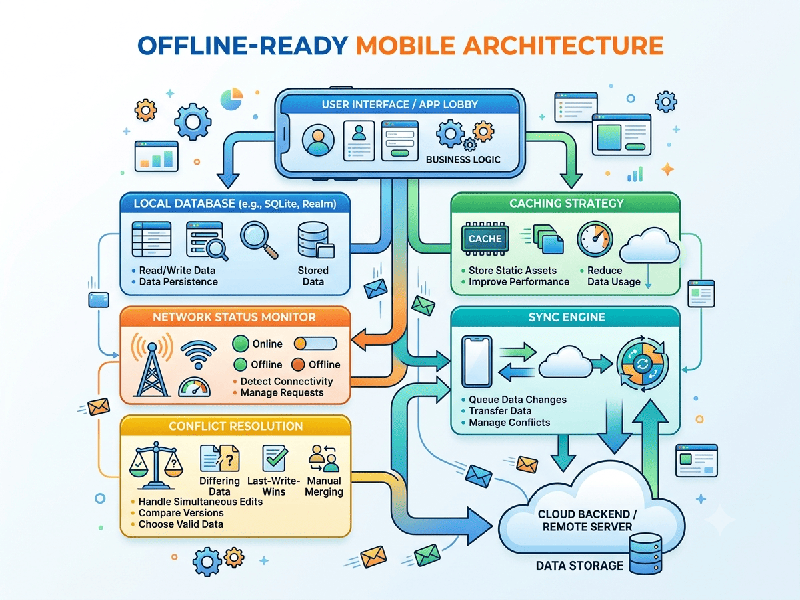
Offline-ready mobile architecture (often called a Local-First
or Offline-First architecture) ensures that a mobile application remains
fully functional, responsive, and data-secure even when the device has an
intermittent, slow, or completely absent internet connection.
Instead of relying on real-time server communication
for every action, the app prioritizes local storage as the primary source of
truth and synchronizes data with the backend in the background when
connectivity is restored.
1. Core Pillars of Offline-Ready Architecture
A. Local-First Storage Layer
- Structured Data: Uses local relational or object
databases like SQLite (via Room on Android or CoreData/SwiftData on
iOS), Realm, or WatermelonDB to store complex relational
records locally.
- Key-Value & Caching: Utilizes lightweight storage
options like MMKV, AsyncStorage, or EncryptedSharedPreferences
for settings, tokens, and small state flags.
B. The Sync Engine & Queue Manager
- Mutation Queue: When a user performs an action
offline (e.g., creating a post or editing a profile), the action is
serialized and stored in an offline queue (Outbox Pattern).
- Background Sync: Background workers (like
WorkManager on Android or BackgroundTasks on iOS) monitor network state
changes and automatically flush the queue once connectivity returns.
C. Connectivity Awareness
- The app continuously monitors
network health (using APIs like NetInfo or platform-specific connectivity
managers) to switch between online syncing and offline local caching
seamlessly.
D. Optimistic UI Updates
- When a user submits data, the
app immediately updates the local UI as if the server already approved it,
providing an instant, zero-latency experience. If the sync fails later,
the app handles rollbacks or user prompts gracefully.
2. Data Synchronization & Conflict Resolution
Strategies
When multiple devices or offline sessions modify the
same data, conflicts are inevitable. Robust architectures use specific
strategies to resolve them:
- Last-Write-Wins (LWW): The update with the newest
timestamp overwrites older versions. Simple to implement, but risks data
loss if a user's offline changes are accidentally overwritten.
- Client-Wins / Server-Wins: Hard rules dictating which
authority takes precedence during a clash.
- CRDTs (Conflict-free Replicated
Data Types):
Advanced data structures mathematically designed so that data can be
merged automatically from any order of operations without conflicts (ideal
for collaborative apps like notes or docs).
- Manual Resolution: Flagging conflicting records in
the UI and prompting the user to choose which version to keep.
3. Recommended Architectural Patterns
A. The Offline-First Repository Pattern
Data is abstracted behind a single repository
interface that decides whether to fetch from the local database or the remote
API:
1.
Read Strategy:
Return data instantly from the local database (Fast UI). Concurrently fetch
fresh data from the API in the background and update the local database if
changes exist (Stale-While-Revalidate).
2.
Write Strategy:
Write data immediately to the local database, add a sync task to the local
queue, and trigger a background sync.
B. Command Query Responsibility Segregation (CQRS)
Separating read models (optimized for quick local
queries and rendering UI) from write models (handling mutations and offline
queuing) simplifies complex sync logic.
4. Key Best Practices
1.
Handle Storage Quotas & Eviction: Mobile devices have strict storage limits. Implement
data cleanup policies (e.g., purging cached media or old logs after 30 days) to
prevent filling up the device disk.
2.
Secure Local Data: Encrypt sensitive local databases using SQLCipher or platform-equivalent
encryption tools to protect user data if the device is lost or stolen.
3.
Lazy Load Heavy Assets: Never store large binary files (like high-res videos or
PDFs) directly in relational databases. Save them to the local file system and
store only the file path or URI in the database.
4.
Test Under Harsh Conditions: Use network simulation tools (like network throttling in
browser/mobile developer tools, Charles Proxy, or turning on airplane mode
mid-transaction) to rigorously test edge cases before deployment.