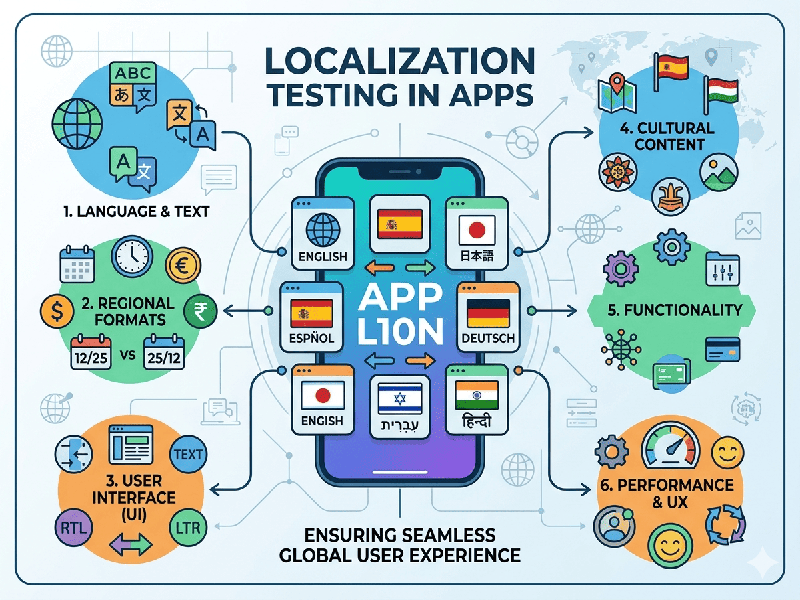
Localization Testing in Apps
Localization Testing (L10n) is the process of verifying that an application is not only translated correctly but also culturally, technically, and linguistically adapted for a specific target market.
1. Key Pillars of Localization Testing
Localization testing is a multi-dimensional check that covers
four primary areas:
A. Linguistic Accuracy
- Translation Quality: Checking for grammar, spelling,
and tone. (e.g., Is the tone formal enough for a Japanese audience or
casual enough for a Brazilian one?)
- Contextual Correctness: Ensuring words with multiple
meanings are used right (e.g., "Home" as a house vs.
"Home" as a main menu).
- Untranslated Strings: Finding "hard-coded"
text that remained in the original language.
B. Visual & UI Integrity
- Text Expansion/Contraction: German text can be 30%
longer than English, while Asian characters are often shorter but
taller. Testing ensures buttons and labels don't break or overlap.
- Right-to-Left (RTL) Support: For languages like Arabic or
Hebrew, the entire UI must flip (mirrored layouts).
- Local Icons: Ensuring symbols aren't
offensive or confusing (e.g., a "mailbox" icon looks different
in the US vs. India).
C. Regional Formats (The "Technical" Layer)
- Currency & Symbols: Switching from $ to ₹ or € and
ensuring the placement is correct (e.g., $10 vs 10 €).
- Date & Time: MM/DD/YYYY (US) vs. DD/MM/YYYY
(India/UK) vs. YYYY/MM/DD (China).
- Number Formatting: Using commas or dots for
decimals (e.g., 1,000.00 vs 1.000,00).
D. Cultural Sensitivity
- Color Symbolism: In some cultures, white
represents purity; in others, it represents mourning.
- Local Regulations: Ensuring compliance with
regional data privacy laws (like GDPR in Europe or DPDP in India).