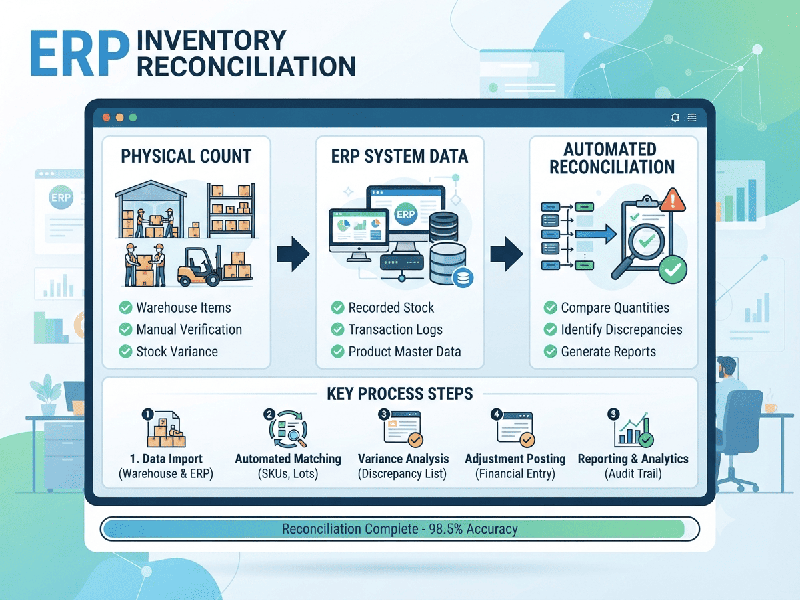
ERP Inventory Reconciliation
ERP inventory reconciliation is the critical process
of aligning your system’s digital stock records with your physical on-hand
inventory. In a modern supply chain, this ensures that the data in your ERP
(such as SAP, Oracle, or Microsoft Dynamics) accurately reflects what is
actually on your warehouse shelves.
Below is the essential framework for effective ERP
inventory reconciliation.
1. Core Objectives
- Accuracy: Eliminate discrepancies between
system balances and physical reality.
- Financial Integrity: Ensure the valuation of
inventory (COGS, asset value) is accurate for accounting purposes.
- Operational Efficiency: Prevent stockouts or
overstocking, which directly impact liquidity and customer satisfaction.
2. The Reconciliation Workflow
To maintain a high level of accuracy, follow these
four distinct steps:
1.
Preparation (The Data Snapshot): Run a "frozen" report from your ERP to get an
exact snapshot of what the system believes is in stock at a specific moment.
2.
Physical Count (The Audit): Perform a physical count (Cycle Count or Wall-to-Wall
Inventory). Ensure that all movement of goods is halted during the count to
prevent data drift.
3.
Variance Analysis: Compare the ERP report against the physical results. Identify the root
cause for each discrepancy:
o Administrative Errors: Data entry mistakes or failure to
record a transaction.
o Operational Losses: Damage, theft, or spoilage.
o System Sync Issues: Latency in API integrations or batch
job failures.
4.
ERP Adjustment:
Once variances are verified, post adjustment entries in the ERP to update the
stock levels and write off any discrepancies (gains/losses) to the appropriate
General Ledger accounts.
3. Best Practices for Modern ERP Systems
- Implement Cycle Counting: Instead of a massive,
error-prone annual audit, use a cycle counting strategy where high-value
items are counted more frequently.
- Utilize Real-Time Scanning: Minimize human error by
integrating barcode scanners or RFID directly into the ERP. This automates
the record-keeping of every "Goods Receipt" and "Goods
Issue."
- Automate Exception Reporting: Set up your ERP to flag
significant variances automatically. This allows your team to investigate
anomalies in real-time rather than waiting for month-end.
- Tighten User Permissions: Restrict the ability to
manually adjust inventory levels to only authorized personnel to ensure
every change has an audit trail.
4. Technical Performance & Integration
If you are facing performance issues during
reconciliation (common in large-scale ERPs):
- Database Indexing: Ensure that inventory tables
are properly indexed for faster lookups during reconciliation reports.
- Off-Peak Processing: Run large reconciliation jobs
during off-peak hours to avoid slowing down your daily warehouse
operations.
- Middleware Monitoring: If you use multiple systems
(e.g., a WMS linked to an ERP), monitor the integration middleware to
ensure data packets aren't getting dropped during synchronization.