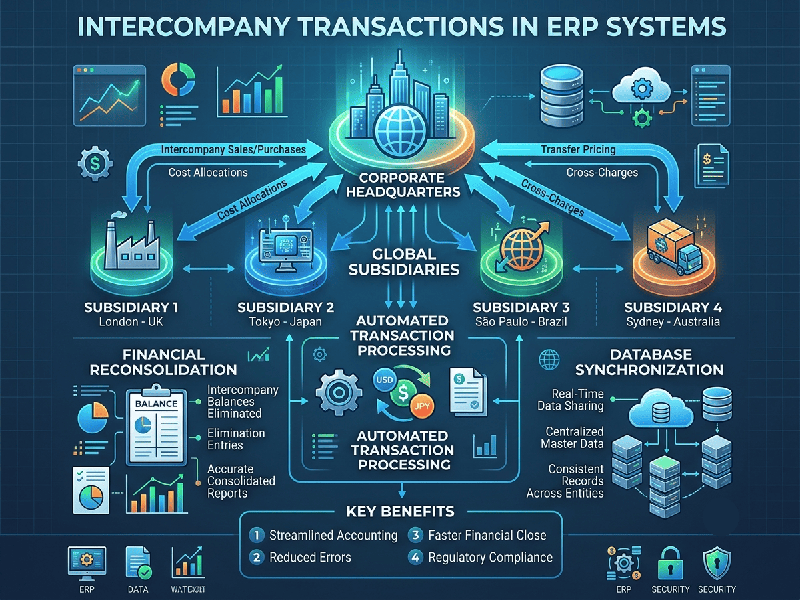
Intercompany Transactions in ERP
Managing intercompany transactions in an ERP
system is critical for organizations operating across multiple legal entities.
When one subsidiary sells goods, provides services, or transfers funds to a
sister company, the ERP must automate the accounting entries, maintain clean
"Due To / Due From" balances, and eliminate these internal
transactions during financial consolidation.
1. Core Setup & Configuration
Proper configuration ensures that transactions between
related entities are mirrored accurately without manual intervention.
Intercompany Trading Partners: Define each legal entity as a
trading partner within the ERP master data so the system recognizes
cross-entity relationships.
Clearing Accounts (Due To / Due From): Establish dedicated balance sheet
accounts for each entity pair (e.g., Entity A Due From Entity B / Entity
B Due To Entity A). Never commingle these with third-party accounts payable
or receivable.
Automated Document Flow: Configure rules for automated
document creation—such as an Intercompany Purchase Order in Entity A
automatically generating a Sales Order in Entity B.
Transfer Pricing Rules: Set up predefined pricing matrices
(e.g., cost-plus or market rate) to ensure regulatory compliance and consistent
valuation across borders.
3. Standard Intercompany Workflow
A typical intercompany transaction flows through a
structured, automated sequence across both legal entities:
1.Step 1: Intercompany Order Generation:Initiation Phase.
Buyer Entity: Creates a purchase order (PO) targeting the selling sister
company as the vendor.
ERP Validation: System checks trading partner status and verifies that
active transfer pricing rules apply.
2.Step 2: Automated Sales Order & Fulfillment:Fulfillment Phase.
Seller Entity: The system automatically converts the incoming PO into a
Sales Order (SO) in the selling entity's books.
Shipment / Service Delivery: Inventory is shipped or services are
rendered, triggering fulfillment documents.
3.Step 3: Mirrored Invoice & Clearing Entry:Financial Posting Phase.
Seller Posts AR: Accounts Receivable is recorded in the seller's books
against the intercompany clearing account.
Buyer Posts AP: Accounts Payable is simultaneously recorded in the buyer's
books against its corresponding clearing account.
4.Step 4: Elimination & Reconciliation:Period-End Phase.
Consolidation: During month-end close, the ERP automatically offsets the
matching Due To and Due From balances so they vanish on consolidated
statements.