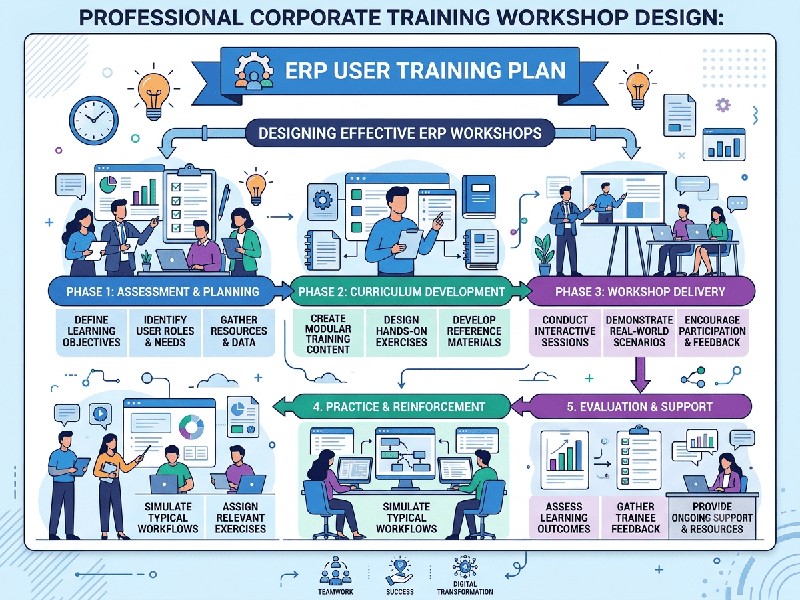
ERP User Training Plans That Actually Work
A successful Enterprise Resource Planning (ERP) user
training plan fails when it is treated as a one-time event right before launch.
It succeeds when it is treated as a structured change management process
tailored to specific job roles.
An effective ERP user training plan focuses on role-based
workflows, hands-on practice, and ongoing support rather than long
lectures. Most ERP implementations fail during user adoption because training
is treated as an afterthought or delivered as generic system overviews.
1. Core Principles of Successful ERP Training
Role-Based, Not System-Based: Teach employees how to perform their
specific daily job tasks in the new system (e.g., "How to process a
purchase order"), not a guided tour of all menu items.
Train in the Sandbox: Give users a risk-free test
environment with realistic dummy data where they can practice without fear of
breaking live records.
Train Super Users First: Identify tech-savvy, respected team
members from each department early. Train them deeply so they become frontline
support during go-live.
Just-In-Time Timing: Schedule end-user training 2 to 4 weeks before
go-live. If you train too early, users forget; if too late, they panic.
2. Phased ERP Training Roadmap
1.Phase 1: Role Mapping & Super User
Identification:4-6
Weeks Before Training Begins.
Map Roles: Group end users by functional job roles (e.g., Accounts
Payable, Warehouse Manager, Sales Rep).
Define Tasks: List the top 5–10 high-frequency tasks each role performs.
Select Super Users: Nominate 1–2 key users per department to join the
core implementation team.
2.Phase 2: Train the Trainer & Content Creation:3-4 Weeks Before Go-Live.
Train Super Users: Conduct deep-dive sessions with Super Users so they
understand end-to-end process flows and common troubleshooting.
Build Quick Reference Guides (QRGs): Create 1–2 page visual step-by-step
PDF guides or 60-second video walkthroughs for critical processes.
3.Phase 3: Hands-On End-User Training:2-3 Weeks Before Go-Live.
Role-Based Workshops: Conduct small, interactive training
sessions (8–12 people max) focused strictly on their specific workflows.
Scenario-Based Exercises: Have users complete realistic daily
scenarios in the sandbox environment (e.g., "Enter this invoice, approve
it, and post payment").
4.Phase 4: Readiness Assessment & Cutover:1 Week Before Go-Live.
Competency Checks: Conduct quick, low-stakes skill assessments to
identify users needing extra help.
Refresher Sessions: Host open office hours for struggling users or
edge-case questions.
5.Phase 5: Go-Live & Hypercare Support:Post Go-Live (Weeks 1-4).
Floor Walking / Virtual Support: Position Super Users directly on the
floor or in dedicated support channels to assist in real time.
Feedback Loop: Log recurring user errors to create targeted micro-learning
sessions or refine documentation.