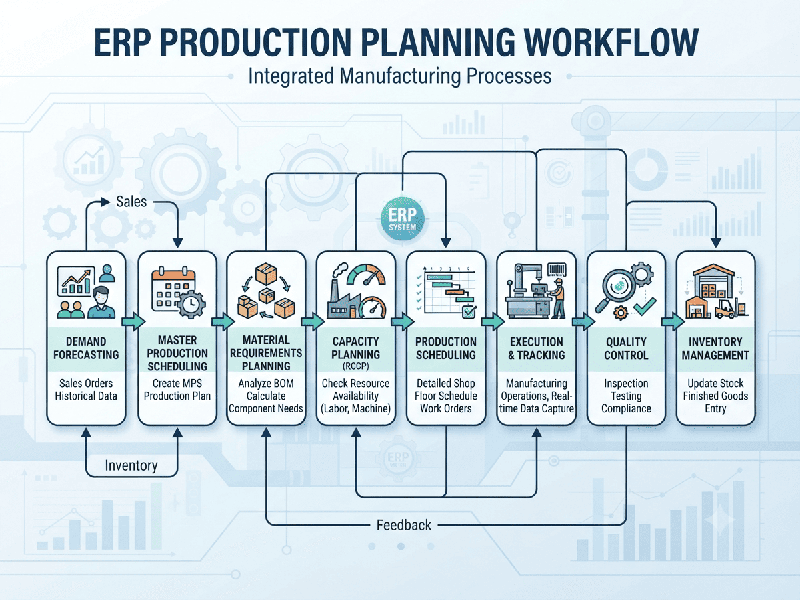
ERP Production Planning Workflows
ERP Production Planning integrates enterprise resource
planning systems with manufacturing execution to bridge the gap between
customer demand and shop-floor reality. Effective production planning ensures
that raw materials, machine capacity, and labor align seamlessly to manufacture
products on schedule without tying up excessive working capital in excess
inventory.
Modern ERP systems (such as SAP, Oracle, or Microsoft
Dynamics) streamline this through a structured, multi-tiered planning hierarchy
often referred to as Manufacturing Resource Planning (MRP II).
Core Stages of the Production Planning Workflow
1. Demand Management & Forecasting
- Sales and Operations Planning
(S&OP):
Combines historical sales data, seasonal trends, and sales pipelines to
generate a rolling demand forecast.
- Master Production Schedule
(MPS): Converts
the aggregate demand plan into specific, time-phased production quantities
for finished goods (e.g., specifying how many units of SKU A must
be finished by Week 3).
2. Materials Requirement Planning (MRP)
Once the MPS is locked, the ERP engine calculates net
material requirements:
- Bill of Materials (BOM)
Explosion: The
ERP breaks down finished goods into sub-assemblies, raw materials, and
components based on the product recipe.
- Inventory Netting: The system checks current
inventory levels and open purchase orders against gross requirements,
generating exact purchase requisitions or work orders for missing
components.
3. Capacity Requirements Planning (CRP)
- Work Center Loading: Before releasing orders to the
floor, CRP evaluates whether available machine hours, tooling, and labor
capacity can handle the scheduled workload.
- Bottleneck Identification: Flags resource constraints
early so managers can adjust shifts, outsource work, or reschedule orders.
4. Shop Floor Control & Execution
- Production Order Release: Converts approved plans into
shop-floor work orders containing routing instructions, component lists,
and digital travelers.
- Real-Time Tracking: Uses barcode scanning, IoT
integrations, or operator terminals to record progress, scrap rates, and
labor hours as tasks move through work centers.
Key Benefits of an Integrated ERP Production Workflow
1.
Reduced Inventory Carrying Costs: Just-in-Time (JIT) material planning prevents excess raw
materials from sitting idle in warehouses.
2.
Improved On-Time Delivery (OTD): Clear visibility into lead times and shop-floor progress
ensures realistic delivery promises to customers.
3.
Agile Exception Handling: If a machine breaks down or a material shipment is delayed,
the ERP instantly recalculates downstream impacts and suggests alternative
schedules.
Best Practices for Implementation
- Maintain Data Integrity: An ERP production plan is only
as accurate as its underlying data. Routinely audit your BOMs, Routing
Sheets (time required per step), and Lead Times.
- Balance Push and Pull: Use Make-to-Stock (MTS) for
high-volume, predictable items, and shift to Make-to-Order (MTO) or
Configure-to-Order (CTO) for customized products to minimize waste.