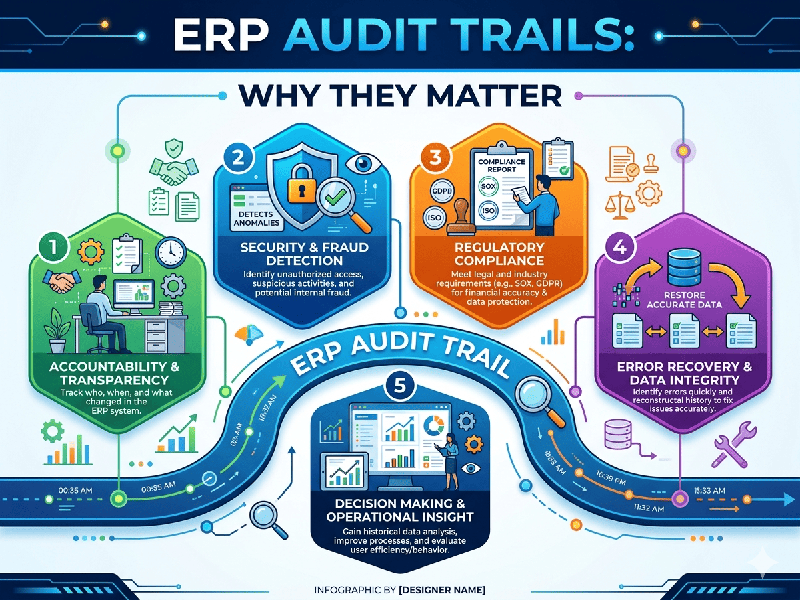
ERP Audit Trails: Why They Matter
In an Enterprise Resource Planning (ERP) system, an Audit
Trail is a sequential, tamper-proof record of every event, transaction, and
system change that occurs. It acts as a "digital black box,"
capturing the who, what, when, and where of every action taken within
your database.
For a firm like Agrived Foods, where compliance,
inventory integrity, and financial transparency are critical, audit trails are
not just "nice to have"—they are a core business requirement.
Why Audit Trails Are Essential
1. Regulatory Compliance and Accountability
Most financial and industry-specific standards (such as food
safety or ISO certifications) require a clear, indisputable history of
transactions.
- The "Who" Factor: By logging user IDs against
every transaction (e.g., changing a price, deleting a purchase order, or
modifying a customer’s credit limit), you create individual
accountability.
- Preventing Fraud: Audit trails provide the
evidence needed to detect internal fraud, unauthorized changes, or
malicious system tampering.
2. Operational Troubleshooting
ERP systems are complex. If a balance sheet doesn’t reconcile
or an inventory count is off, an audit trail allows your team to "trace
the drift."
- Reversal Capability: If a user accidentally deletes
or modifies a critical record, the audit trail helps your technical team
restore the data to its previous state accurately.
- Performance Optimization: Audit logs help identify
"system-heavy" actions that might be slowing down your ERP
performance during peak hours.
3. Data Integrity and Security
Audit trails provide the data necessary to secure your
infrastructure against both external threats and internal errors.
- Unauthorized Access Detection: If an account suddenly accesses
records they don’t typically use, the audit log acts as an early-warning
system.
- System "Single Source of
Truth": It
eliminates the "he said, she said" dynamic when multiple teams
(e.g., Finance and Logistics) are accessing the same master data.
Critical Elements of a Robust ERP Audit Trail
To be effective, every entry in your audit log must capture
these five variables:
1.
User Identity:
Who performed the action?
2.
Timestamp:
Exactly when did it happen (down to the millisecond)?
3.
The Action:
Was it a Create, Read, Update, or Delete (CRUD) operation?
4.
The "Before" and "After" Value: What was the value before the
change, and what is it now? (Essential for financial auditing).
5.
The Reason Code: Why was the change made? (e.g., "Correcting shipping error,"
"Customer returned order").
Best Practices for Management
- Don't Log Everything: Logging every single cursor
movement will bloat your database and kill performance. Focus on High-Value
Fields (e.g., product pricing, bank account details, inventory
quantities, and vendor master data).
- Separate Access: The people who use the ERP
system should never have permission to edit or delete the audit
logs. Audit logs must be stored in a write-once, read-many (WORM) format.
- Regular Review: Set up automated alerts for
"high-risk" actions, such as an order deletion or a significant
price change, and schedule a monthly audit review.