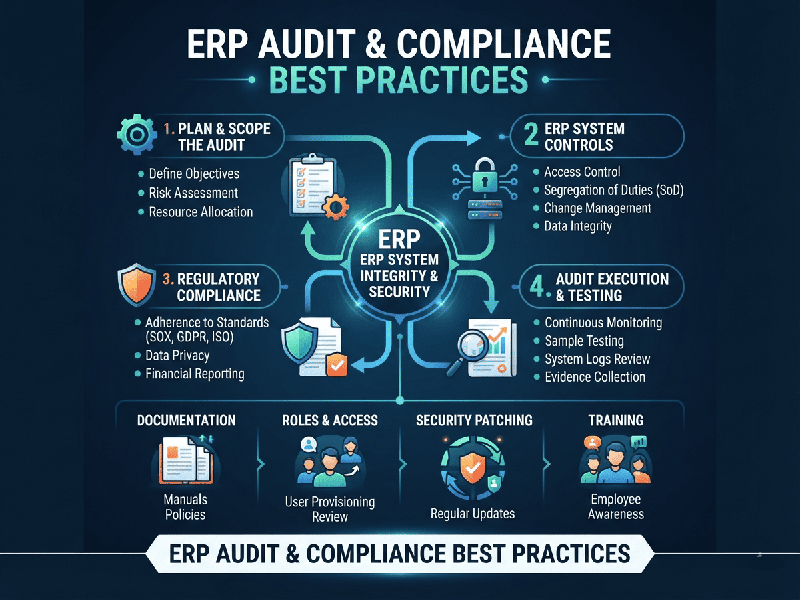
ERP Audit & Compliance Best Practices
An Enterprise Resource Planning (ERP) Audit &
Compliance review ensures that your core business systems maintain data
integrity, secure sensitive information, meet legal/regulatory mandates, and
operate free of internal fraud or procedural bottlenecks.
1. Core Frameworks of an ERP Audit
- Security & Access Control
Audits:
Evaluate user permissions to ensure strict adherence to the Principle
of Least Privilege (PoLP). Look closely at segregation of duties (SoD)
to prevent a single user from controlling conflicting processes (e.g.,
creating a vendor and approving invoices).
- Compliance Audits: Confirm that system
configurations align with national and industry-specific statutory
requirements (e.g., financial reporting standards, tax regulations, and
data privacy laws).
- Process & Workflow Audits: Trace end-to-end transactions
(such as Procure-to-Pay or Order-to-Cash) to check if automated system
controls and approval thresholds are strictly enforced, or if manual
workarounds are bypassing them.
- Configuration & Change
Management Audits: Review logs to track who authorized and implemented system patches,
configuration updates, or custom code modifications.
2. Key Compliance & Audit Best Practices
Establish Rigorous Access Controls and Segregation of
Duties (SoD)
- Enforce Role-Based Access
Control (RBAC) so employees only view or alter data required for their
specific job functions.
- Continuously scan for SoD
conflicts (e.g., combining inventory management and general ledger write
access). Use automated governance, risk, and compliance (GRC) tools to
flag violations.
Maintain Immutable Audit Trails
- Ensure the ERP system logs all
critical activities—especially master data changes, financial overrides,
user permission updates, and administrative deletions.
- Verify that these audit logs are
read-only, tamper-evident, and securely archived to meet regulatory
retention mandates.
Conduct Regular Compliance Gap Analyses
- Map your current regulatory
landscape (e.g., corporate governance, data localization, or cross-border
trade guidelines) against your ERP’s native capabilities.
- Perform periodic gap analyses to
update system configurations whenever statutory mandates or business
requirements evolve.
Minimize and Control Customizations
- Heavy, undocumented
customizations create security blind spots and complicate auditability
during software upgrades.
- Rely on standard, out-of-the-box
ERP workflows wherever possible, and subject any custom scripts or
modifications to strict code reviews and security testing.
Automate Compliance Reporting & Monitoring
- Leverage real-time ERP analytics
and automated workflow alerts to flag transactional anomalies (e.g.,
duplicate vendor payouts, off-hour logins, or unusual discount approvals).
- Standardize compliance
dashboards so internal and external auditors can rapidly access clean,
structured financial and operational datasets.
Prioritize Data Hygiene and Master Data Management
Inconsistent or duplicate records compromise financial reporting accuracy. Implement validation rules at the data-entry level to ensure clean input across procurement, inventory, and sales.