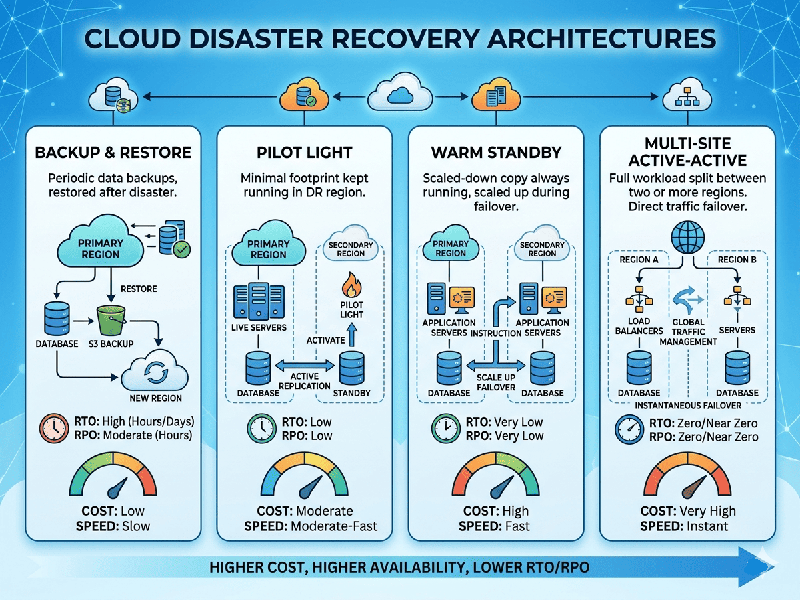
Disaster Recovery Architectures in Cloud
Disaster Recovery (DR) in the cloud is designed to ensure
business continuity by minimizing downtime and data loss when infrastructure
fails. Cloud providers offer a spectrum of architectures, ranging from
low-cost/high-recovery-time options to high-availability/near-zero-downtime
solutions.
These architectures are generally categorized by two key metrics: Recovery Time Objective (RTO)—the maximum acceptable delay before service is restored—and Recovery Point Objective (RPO)—the maximum acceptable amount of data loss.
Deep Dive into Architectural Patterns
1. Backup & Restore
This is the most cost-effective method. You take snapshots of
your databases and backups of your files, storing them in a different region.
- Workflow: Data is replicated
$\rightarrow$ Disaster occurs $\rightarrow$ Infrastructure is deployed
(via Infrastructure as Code) $\rightarrow$ Data is restored.
- Best for: Non-critical applications or
environments where a few hours of downtime is acceptable.
2. Pilot Light
You keep the "critical core" alive—usually just the
database. The rest of the infrastructure (EC2 instances, Load Balancers)
remains as configuration files until a trigger event occurs.
- Workflow: Database replication is
constant $\rightarrow$ Disaster occurs $\rightarrow$ Launch/scale
application servers $\rightarrow$ Redirect traffic.
- Best for: Systems where you need faster
recovery than simple backups but don't need instant availability.
3. Warm Standby
You maintain a working, smaller version of your
infrastructure. It is not capable of handling full production load, but it is
ready to handle traffic immediately.
- Workflow: Constant replication to a
smaller fleet $\rightarrow$ Disaster occurs $\rightarrow$ Scale out the
existing fleet to match production capacity.
- Best for: Business-critical applications
that require faster recovery times.
4. Multi-Site Active-Active
Your application runs in two or more regions simultaneously.
All regions serve traffic. If one region fails, the global load balancer (e.g.,
Route 53 or CloudFront) routes all traffic to the remaining healthy region.
- Workflow: Multi-region deployment
$\rightarrow$ Cross-region data synchronization $\rightarrow$ Automatic
failover.
- Best for: Mission-critical applications
with zero tolerance for downtime.
Key Components for Success
- Infrastructure as Code (IaC): Use tools like Terraform or AWS
CloudFormation to ensure your DR environment is identical to your
production environment.
- Data Replication: Ensure databases are set up for
cross-region asynchronous or synchronous replication.
- Global Traffic Management: Use DNS-based failover (e.g.,
health checks) to automatically reroute users during a regional outage.
- Testing: A DR plan that is not tested is
effectively a plan that will fail. Perform regular "Game Day"
exercises to simulate failure and practice recovery.
Critical Considerations
- Compliance: Ensure your data residency and
replication strategy meets regional legal requirements.
- Cost vs. Latency: Synchronous replication ensures
no data loss (RPO=0) but introduces latency. Asynchronous replication is
faster but risks slight data loss.