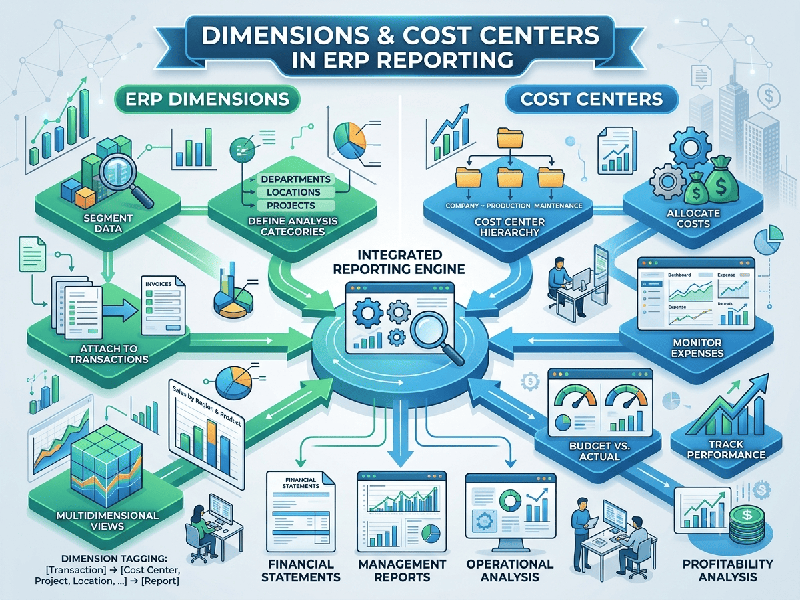
Dimensions and Cost Centers in ERP Reporting
In Enterprise Resource Planning (ERP) systems,
financial and operational reporting relies heavily on how data is categorized,
tracked, and sliced. Two of the most powerful structures for this are Cost
Centers and Dimensions.
While both help organizations understand where money
is spent and earned, they serve distinct architectural and analytical purposes.
1. What is a Cost Center?
A Cost Center is a distinct organizational
unit, department, or function within a company that incurs costs but does not
directly generate revenue. It represents where or who within the
organizational hierarchy is responsible for an expense.
Primary Purpose: Budgeting, expense control, and managerial
accountability.
Examples: Human Resources, Information Technology, Legal, Marketing
Department, or Facility Management.
In ERP Reporting: Cost centers allow finance teams to track overheads
against a budget. For example, the IT department's cost center will accumulate
expenses for software licenses, hardware maintenance, and salaries, enabling
variance analysis (actual spend vs. budgeted spend).
2. What are ERP Dimensions?
Dimensions (often called analytical dimensions, tags, or segments) are
multi-dimensional attributes attached to financial and operational
transactions. Instead of bloating the Chart of Accounts with thousands of rigid
account codes, dimensions allow you to "tag" a single transaction
with multiple context markers.
Primary Purpose: Flexible, multi-angle data slicing and business
intelligence reporting.
Common Examples:
Geography / Region: North America, EMEA, APAC
Project / Campaign: Project Alpha, Q3 Product Launch
Product Line / Service: SaaS Subscription, Hardware,
Consulting
Customer Segment: Enterprise, SMB, Retail
In ERP Reporting: Dimensions transform flat financial statements into
multidimensional analytics. For instance, a single software subscription
expense can be tagged simultaneously with a Cost Center (IT), a Project
(Cloud Migration), and a Region (North America).
4. How They Work Together in ERP Reporting
Modern ERP systems (such as SAP, Dynamics 365,
NetSuite, or Odoo) combine Cost Centers and Dimensions to eliminate the need
for complex, rigid account structures.
Instead of creating separate general ledger accounts
for “IT Software Subscriptions for Project Alpha in North America” and “IT
Software Subscriptions for Project Beta in EMEA”, you use:
A Single General Ledger Account: Software Expense.
A Cost Center: IT Department.
Dimensions: Project = Alpha / Beta, Region = North America / EMEA.
Benefits of Combined Reporting
Lean Chart of Accounts: Prevents account code explosion
while retaining infinite reporting granularity.
Advanced Profitability Analysis: Allows leadership to see not just
total departmental spend, but how specific projects, products, or regions
consume resources across different organizational units.
Dynamic Dashboards: Empowers finance and operations teams to slice data
on the fly without running manual spreadsheets or custom SQL queries.