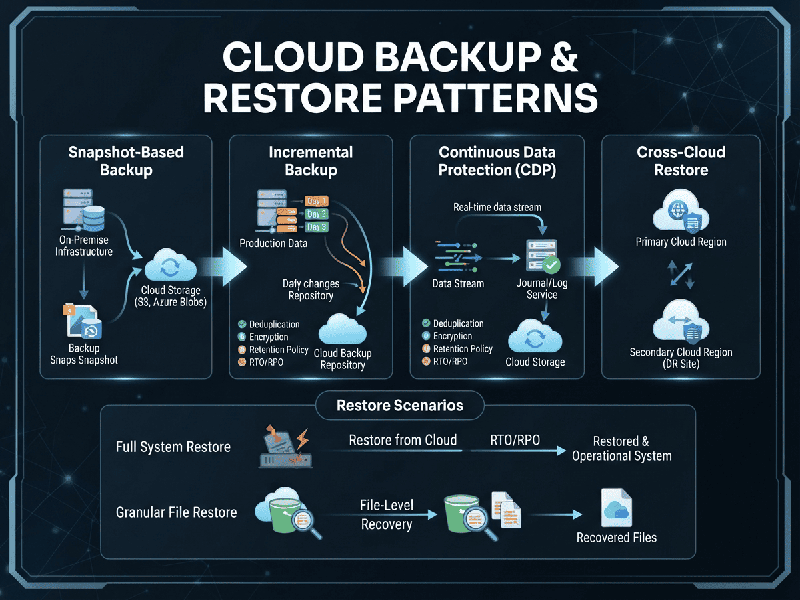
Cloud Backup & Restore Patterns
Cloud backup and restore architectures rely on several
standard patterns depending on data size, Recovery Time Objectives (RTO),
Recovery Point Objectives (RPO), and cost constraints.
1. Core Architecture Patterns
A. Direct-to-Cloud (Cloud-to-Cloud)
- How it works: Data flows straight from the
source (on-premises servers, endpoints, or SaaS applications) directly to
a cloud object storage tier or backup provider.
- Best for: Small-to-medium workloads,
remote endpoints, and SaaS applications (e.g., Microsoft 365, Google
Workspace).
- Pros: Eliminates local backup
hardware management; highly scalable.
- Cons: Heavily reliant on internet
bandwidth; initial full backups can take a long time.
B. Hybrid Backup (Local-to-Cloud /
Disk-to-Disk-to-Cloud)
- How it works: Data is first backed up to a
local on-premises appliance or staging storage, which then replicates or
syncs a copy to the cloud.
- Best for: Enterprise workloads with large
datasets requiring fast operational recovery.
- Pros: Local restores happen instantly
over local networks; cloud acts as an offsite safety net for disasters.
- Cons: Higher upfront hardware costs
for local staging appliances.
C. Backup and Replication (Disaster Recovery Pattern)
- How it works: Beyond taking static backup
archives, virtual machines (VMs) or database volumes are continuously or
periodically replicated to a secondary cloud environment (warm or hot
standby).
- Best for: Mission-critical applications
requiring minimal downtime.
- Pros: Extremely low RTO and RPO;
allows rapid spin-up of entire infrastructures during an outage.
- Cons: Higher ongoing compute and
storage costs in the cloud.
2. Data Strategy Patterns
- Full Backup Pattern: Captures a complete copy of all
selected data. High storage cost, but fastest recovery time.
- Incremental Backup Pattern: Captures only data changed
since the last backup (any type). Minimizes storage and transfer
bandwidth, but slower recovery as it requires chaining multiple restore
elements.
- Differential Backup Pattern: Captures all changes made since
the last full backup. Balances storage space and restoration speed
better than pure incrementals.
- Synthetic Full Backup: The backup server combines a
previous full backup with subsequent incremental backups locally or in the
cloud to create a new full backup without straining source production
environments.
3. Best Practices for Implementation
- The 3-2-1-1 Rule: Keep 3 copies of data (1
primary, 2 backups), across 2 different media types, with 1
copy stored offsite (the cloud), and 1 copy completely immutable
(air-gapped or write-once-read-many) to protect against ransomware.
- Encryption Everywhere: Ensure data is encrypted in
transit (via TLS/SSL) and at rest using robust keys managed via
cloud KMS or customer-managed keys (CMK).
- Automated Recovery Testing: Regularly run automated restore
drills to validate that your backup files are uncorrupted and that your
documentation matches reality.