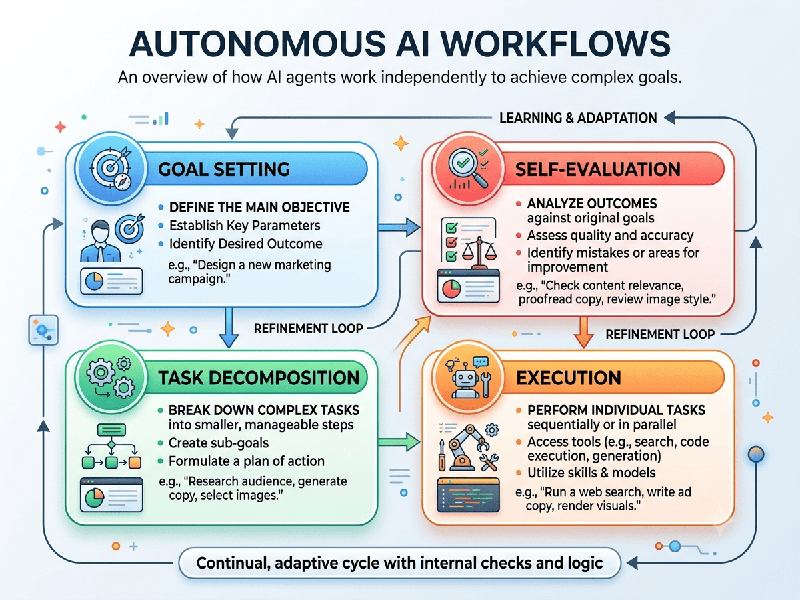
Autonomous AI Workflows
Autonomous AI workflows represent a shift from traditional,
rigid software automation to self-directing, intelligent systems. Unlike
traditional scripts that follow strict "if-then" rules and break when
faced with unexpected scenarios, autonomous AI workflows leverage AI models and
agents to understand intent, make decisions, execute tasks, and adapt to
changing conditions with minimal human intervention.
1. Key Components of an Autonomous AI Workflow
- The Trigger: The event that initiates the
process (e.g., a customer email arriving, an invoice upload, a database
modification, or a scheduled cron job).
- The Intelligence/Agent Layer: Large language models or
specialized AI agents that act as the "brain." They analyze
unstructured data (text, images, audio), determine context, and reason
through the steps needed to achieve a goal.
- Tool Integration: Unlike standard chatbots that
only generate text, autonomous workflows allow AI agents to use tools—such
as calling APIs, querying SQL databases, searching the web, or running
code.
- Human-in-the-Loop Checkpoints: Strategic guardrails where the
system pauses and requests human authorization before executing
high-stakes tasks (e.g., approving a high-value transaction or issuing a
major refund).
2. How They Work (The Lifecycle)
1.
Input & Collection: The system ingests raw data from disparate sources (CRMs,
email inboxes, file storage).
2.
Contextual Reasoning: The AI evaluates the input, categorizes the request, extracts key
details, and dynamically decides the path forward based on past data and
established guidelines.
3.
Autonomous Execution: The workflow interacts with external enterprise applications via APIs or
scripts to complete the task end-to-end.
4.
Feedback & Logging: Every step, decision, and outcome is tracked for auditing,
allowing the system to refine future actions and optimize efficiency.
3. Benefits Over Traditional Automation
- Handling Unstructured Data: Seamlessly processes free-form
customer messages, complex PDFs, or messy spreadsheets without requiring
rigid formatting.
- Exception Handling: When reality deviates from the
standard path, autonomous workflows dynamically adapt instead of failing
or halting.
- Speed & Scalability: Operates 24/7, compressing
decision cycles and handling thousands of concurrent tasks without
proportional headcount growth.
4. Popular Use Cases
- Customer Support &
Operations:
Reading support tickets, cross-referencing customer history via APIs,
drafting personalized solutions, and executing refunds or ticket routing.
- Finance & Accounting: Extracting line items from
unstructured invoices, matching them against purchase orders, and logging
them into accounting systems.
- Talent Acquisition: Screening resumes against job
requirements, coordinating interview schedules, and managing candidate
communications.
- IT & DevOps: Triaging bug reports, running
automated code testing, and monitoring system health metrics.