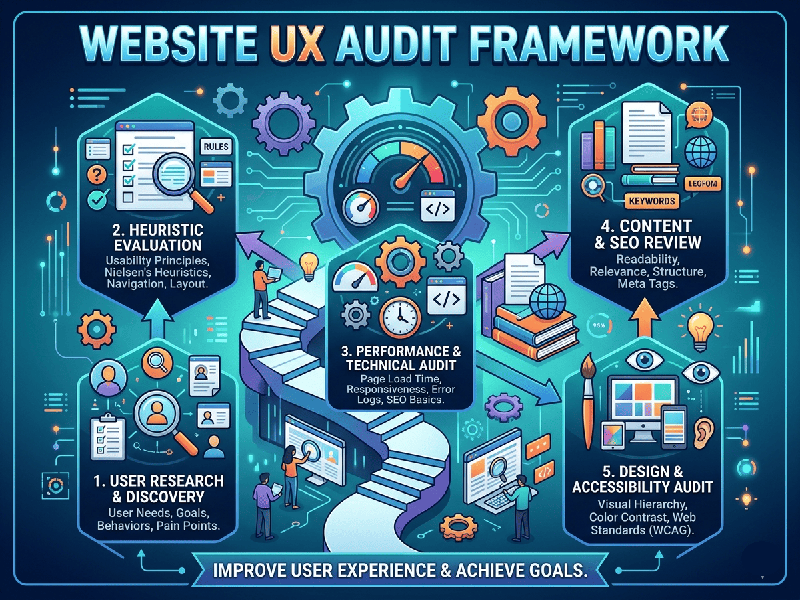
Website UX Audit Framework
A Website UX (User Experience) Audit is a systematic
evaluation of a site's performance, usability, and accessibility. Think of it
as a "health checkup" for your digital asset to identify where users
are getting stuck and where you're losing conversions.
1. Discovery and Goal Setting
Before looking at the design, you must understand the
business context.
- Define Personas: Who is the target audience?
What are their primary pain points?
- Identify KPIs: Are we auditing to increase
sales, reduce bounce rates, or improve time-on-page?
- User Journeys: Map out the critical paths
(e.g., Landing Page → Product Page → Checkout).
2. The Heuristic Evaluation
This is the manual "expert review" based on
established usability principles (like Nielsen’s 10 Heuristics).
- Visibility of System Status: Does the user always know
what’s happening? (e.g., loading bars, success messages).
- Consistency and Standards: Does the site follow expected
conventions? (e.g., clicking a logo takes you home).
- Error Prevention: Are forms validated in
real-time to prevent "Submit" button frustration?
- Recognition vs. Recall: Is the navigation intuitive so
users don't have to memorize where things are?
3. Quantitative Analysis (The "What")
Look at the hard data to see where the friction is actually
happening.
- Google Analytics/Search Console: Identify pages with high bounce
rates or low session durations.
- Heatmaps (Hotjar/Microsoft
Clarity): See
where people are clicking, moving their mice, and how far they are
scrolling.
- Conversion Funnels: Pinpoint exactly which step of
the checkout or sign-up process has the highest "drop-off" rate.
4. Qualitative Analysis
Numbers tell you what is happening; users tell you why.
- User Interviews/Testing: Watch a real person try to complete a task. Note where they hesitate or voice confusion.