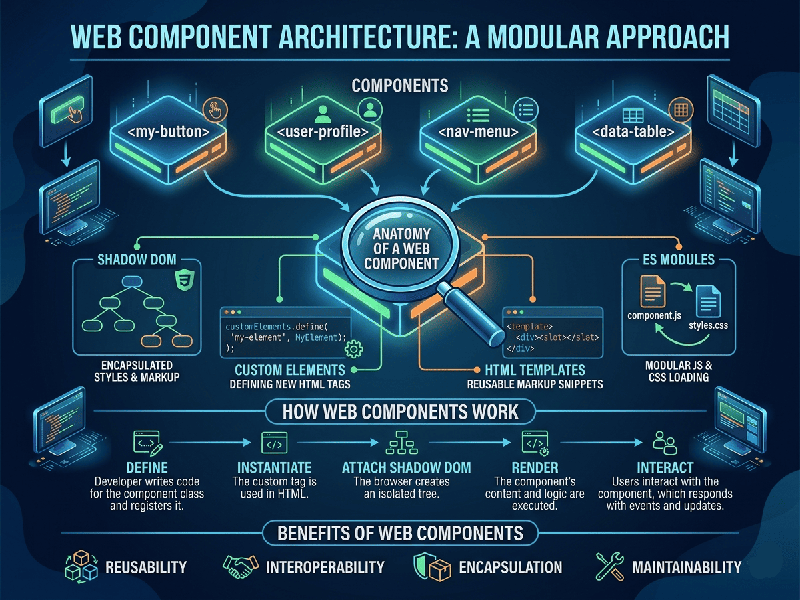
Web Component Architecture
Web Component Architecture is a suite of different
technologies allowing you to create reusable, encapsulated HTML tags that work
across any JavaScript framework (or no framework at all).
Below are two ways to understand this: one through the Internal
Technical Pillars and the other through the Design System Strategy.
The Technical Foundations (The "How")
This perspective focuses on the four W3C standards that make
Web Components functional and isolated from the rest of the page.
1. Custom Elements
These are the APIs that allow you to define your own HTML
tags (e.g., <user-card> or <product-slider>). They give you
lifecycle hooks—like connectedCallback—to control what happens when the element
enters or leaves the DOM.
2. Shadow DOM
This provides encapsulation. It keeps the CSS and
JavaScript of your component private, so styles from the main page don't
"leak" in and break your component, and your component’s styles don't
accidentally change the look of the rest of the site.
3. HTML Templates (<template> and <slot>)
- Templates: Allow you to define a markup
structure that isn't rendered until you "activate" it with
JavaScript.
- Slots: Act as placeholders where users
can drop their own text or images into your component, making them highly
flexible.
4. ES Modules
This is the standard way to package and distribute your components files, making them easy to import into any project just like a standard library.