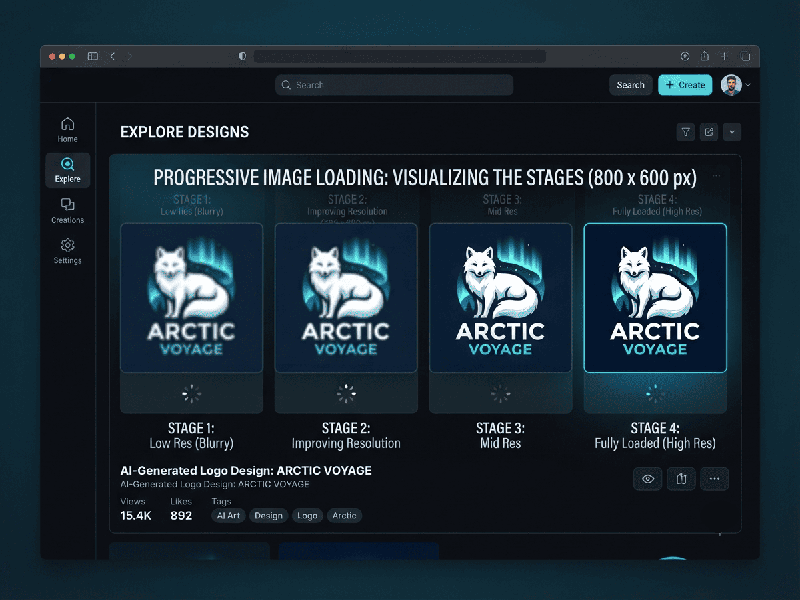
Progressive Image Loading
Progressive Image Loading is a web performance technique that
displays a low-quality, blurry version of an image immediately as the page
loads, which is then gradually replaced by a high-resolution version as the
data finishes downloading.
Instead of showing a blank space or a white box while
a large image loads, this method provides immediate visual feedback to the
user, significantly improving the perceived performance of your website.
Why Use Progressive Loading?
- Improved Perceived Performance: The page feels faster because
the user sees "something" rather than a loading spinner or empty
gaps.
- Reduced Bounce Rates: Users are less likely to leave
a page that populates content quickly, even if it starts in low
resolution.
- Better User Experience: It eliminates "layout
shifts"—when text jumps around because a late-loading image suddenly
takes up space.
Common Techniques
1. Progressive JPEGs (The Standard Method)
Unlike standard "baseline" JPEGs that load
from top to bottom, Progressive JPEGs are encoded to load the entire
image at once in increasingly sharper "passes."
- Pass 1: A very pixelated, blurry
preview.
- Subsequent Passes: Clarity increases until the
full resolution is achieved.
- Benefit: No extra code needed; it is
handled by the image file format itself.
2. Placeholder/Blur-Up Technique
This method uses two versions of the same image:
- Tiny Preview: A tiny, heavily compressed, or
base64-encoded string (often < 2KB) that is blurred using CSS.
- Main Image: The full-resolution asset
loaded asynchronously.
- The Swap: Once the main image downloads,
a small JavaScript snippet replaces the placeholder. This is popular in
modern frameworks like React and Next.js (e.g., using next/image).
3. Low-Quality Image Placeholders (LQIP)
A design-centric approach where a very small,
low-quality image is used as the initial src attribute. Once the main image
loads, the browser swaps it out. This is effective for maintaining brand
aesthetics while waiting for high-resolution assets to render.
Implementation Checklist
1.
Optimize Asset Sizes: Even with progressive loading, the final image should be compressed (use
modern formats like WebP or AVIF).
2.
Use aspect-ratio: In your CSS, always define the width and height (or aspect-ratio) of the
container. This prevents the page content from shifting when the high-quality
image finally swaps in.
3.
Lazy Loading:
Combine progressive loading with native loading="lazy" on your
<img> tags to ensure images only load when they are about to enter the
viewport.
4.
Prioritize Above-the-Fold: For images at the very top of the page, consider skipping
the "blur" step and loading the full image immediately to improve
Largest Contentful Paint (LCP) scores.