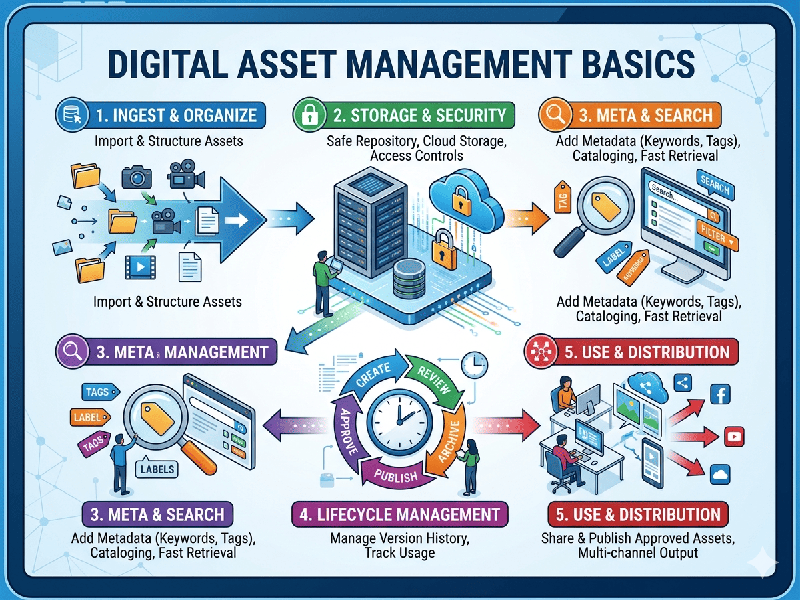
Digital Asset Management Basics
Digital Asset Management (DAM) is the practice of organizing,
storing, and retrieving rich media—such as images, videos, and documents—from a
central "single source of truth." It ensures that everyone on a team
can find the right file in the right format instantly.
1. The Core Lifecycle of an Asset
Understanding how an asset moves through your system is the
first step to managing it.
- Ingestion: Getting files into the system
(uploading).
- Annotation: Adding Metadata (tags,
descriptions, dates) to make the file searchable.
- Storage: Securely hosting the file in a
cloud or on-premise environment.
- Retrieval: Using search filters to find
specific assets.
- Distribution: Sharing assets with internal
teams or external partners via links or portals.
2. Metadata: The Secret Sauce
Without metadata, a DAM is just a cluttered hard drive.
Effective systems use three types of data to categorize files:
- Technical Metadata: Automatically generated info
like file size, resolution, and format (e.g., .JPG, .MP4).
- Descriptive Metadata: Keywords, titles, and captions
that describe what is in the asset.
- Administrative Metadata: Rights management, expiration
dates, and usage licenses (crucial for legal compliance).
3. Taxonomy and Folder Structure
A logical hierarchy ensures that even new team members can
navigate the library.
- Flat vs. Hierarchical: While folders are intuitive, a
"flat" structure relying heavily on Tags is often more
powerful for large-scale digital libraries.
- Naming Conventions: Standardized file naming (e.g.,
2026_ProjectName_AssetType_v01) prevents version confusion.
4. Version Control and Permissions
DAM systems prevent the "Final_Final_v2.doc"
nightmare.
- Version History: Keeping a trail of changes so
you can revert to an older version if a mistake is made.
- Access Control: Defining who can View, Edit,
or Download specific assets. This protects sensitive brand
material.
5. Why Teams Use DAM
- Efficiency: No more digging through email
threads to find a logo.
- Brand Consistency: Ensures the whole team is using
the latest, approved version of a creative asset.
ROI Optimization: Easily repurpose old content instead of paying to recreate