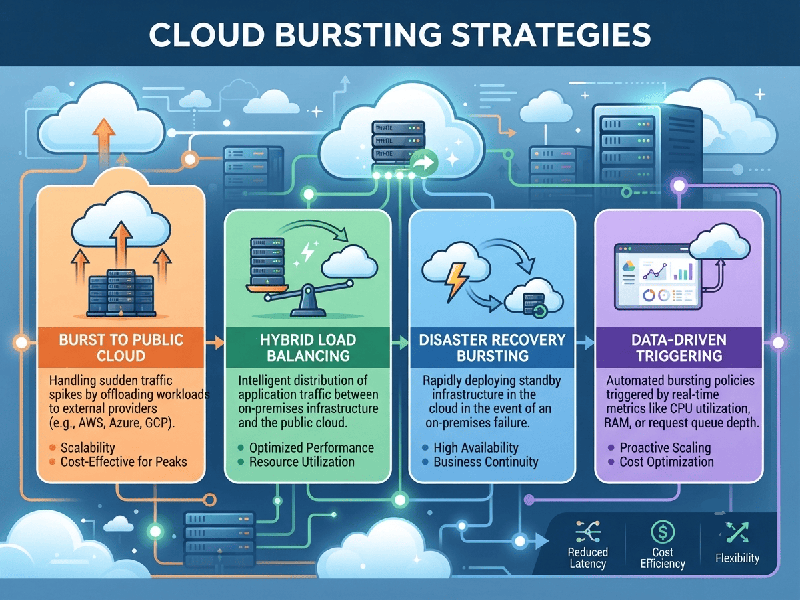
Cloud Bursting Strategies
Cloud bursting is a hybrid cloud deployment configuration that enables
applications running on a private cloud or on-premises data center to
dynamically expand ("burst") into a public cloud (such as AWS, GCP,
or Azure) when demand for computing capacity spikes.
This approach prevents performance degradation and
downtime during peak traffic periods while avoiding the heavy capital
expenditures of maintaining idle on-premises hardware.
1. Core Cloud Bursting Strategies
Organizations choose their bursting strategy based on
traffic predictability, application architecture, and operational readiness.
🔹 Automated (Reactive) Bursting
This strategy relies on real-time monitoring and
predefined thresholds (e.g., CPU utilization > 80%, memory exhaustion, or
network latency). When a threshold is breached, orchestration tools
automatically provision instances in the public cloud and adjust load balancers
to route excess traffic there.
- Best for: Unpredictable traffic spikes,
sudden viral events, or flash sales.
- Key Tools: Kubernetes (HPA), AWS Auto
Scaling, Azure Autoscale.
🔹 Scheduled (Predictive) Bursting
If traffic patterns are predictable due to historical
trends or specific calendar events, resources are provisioned in the public
cloud before the spike occurs.
- Best for: End-of-month financial
processing, holiday shopping seasons, or daily batch processing jobs.
- Key Tools: Jenkins, Terraform, cron-based
automation scripts.
🔹Split-Tier (Distributed) Bursting
Instead of moving entire application workloads, only
specific tiers are hosted or bursted into the public cloud. For instance, the
front-end web tier or stateless microservices scale out into the public cloud,
while the stateful database tier remains secured within the private data
center.
- Best for: Applications with strict data
residency compliance where data cannot easily leave the on-premises
environment.
2. Key Components for a Successful Deployment
For cloud bursting to function without disruption,
three core pillars must be tightly integrated:
Network Connectivity & Latency Management
High latency between your local data center and the
public cloud can break application performance.
- Dedicated Connections: Utilize dedicated, high-speed
pipelines like AWS Direct Connect, Azure ExpressRoute, or Google
Cloud Interconnect rather than standard public internet.
- Load Balancing: Implement global server load
balancing (GSLB) to smoothly route traffic between environments based on
capacity and proximity.
Containerization & Orchestration
Monolithic applications are notoriously difficult to
burst due to configuration mismatches between environments.
- Kubernetes (K8s): Containerizing workloads
ensures they run identically on-premises and in the public cloud.
- Hybrid Mesh: Tools like Google Anthos,
Azure Arc, or Red Hat OpenShift provide a single pane of
glass to manage cluster scaling across hybrid boundaries.
Data Synchronization & Storage
The biggest bottleneck in cloud bursting is data
gravity—moving massive data sets to the cloud on short notice is inefficient.
- Stateless Workloads: Ideally, keep bursted workloads
stateless.
- Storage Caching &
Replication: If
data is required, use hybrid cloud storage solutions (e.g., NetApp Cloud
Volumes, AWS Storage Gateway) that asynchronously replicate or cache
active data sets in the cloud ahead of time.
3. Critical Challenges & Mitigation Strategies
Watch
Out for Cloud Egress Fees While moving data into the public cloud is
usually free, moving processed data back to your private data center (egress)
can incur substantial charges.
- Mitigation: Design bursted workloads to
process data in the cloud and return only minimal results/logs, or use
cloud-native analytics directly on the bursted environment.
- Security & Compliance: Ensure that your public cloud
environment adheres to the same security postures, firewalls, and data
compliance standards (such as GDPR, HIPAA, or local data localization
laws) as your on-premises infrastructure.
- Performance Tuning: Mismatches in hardware
performance (e.g., older on-premises CPUs vs. latest-generation cloud
instances) can cause unexpected load distribution issues. Normalize your
compute metrics across environments.