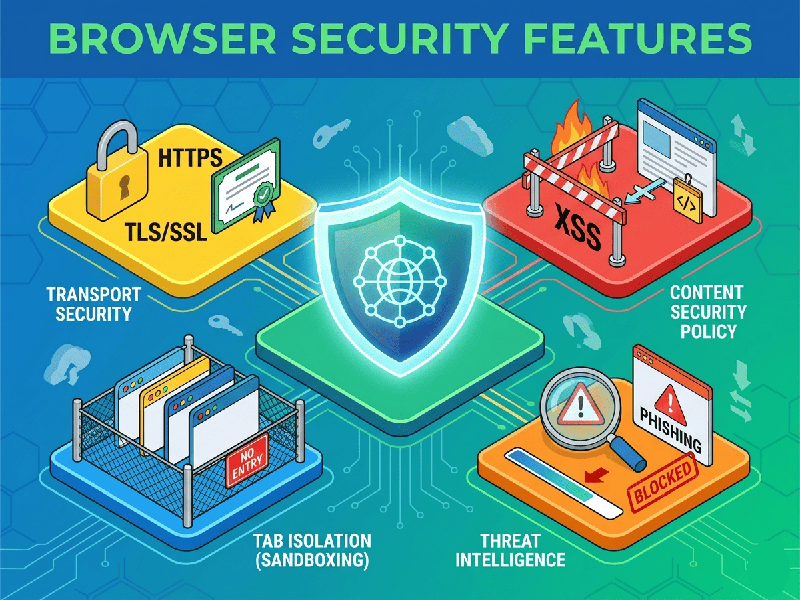
Browser Security Features
Modern browser security in 2026 is no longer just about
blocking pop-ups; it is a complex, multi-layered architecture designed to treat
every website as a potential threat.
The primary goal of these features is to prevent data
exfiltration, malicious code execution, and identity theft.
1. Core Architecture Defenses
Modern browsers like Chrome, Firefox, and Safari use
"Defense in Depth" at the process level:
- Sandboxing: Every tab, plugin, and
extension runs in its own "sandbox"—a restricted environment
with zero access to your computer's files, webcam, or microphone unless
you explicitly grant permission. If a website is compromised, the damage
is trapped inside that sandbox.
- Site Isolation: This ensures that pages from
different websites are always put into different operating system
processes. Even if a malicious site exploits a bug in the browser engine,
Site Isolation makes it nearly impossible to steal data (like passwords or
cookies) from other open tabs.
- Automatic HTTPS Upgrading: Browsers now default to
"HTTPS-First" mode. If you type a legacy URL (http://), the
browser automatically attempts to establish a secure, encrypted connection
before sending any data.
2. Web Attack Prevention Mechanisms
These features are designed to break the "kill
chain" of common web attacks like Cross-Site Scripting (XSS).
- Content Security Policy (CSP): A powerful tool where a website
tells the browser, "Only run scripts from these three trusted
domains." If a hacker tries to inject a malicious script from an
external server, the browser will block it instantly.
- Anti-Fingerprinting: Advertisers and hackers use
"fingerprinting" (collecting your screen resolution, battery
level, and installed fonts) to track you without cookies. Modern browsers
now "standardize" this data, making your computer look identical
to millions of others to preserve anonymity.
- Enhanced Tracking Protection
(ETP): By
default, browsers now block third-party "tracker" cookies that
follow you across the web, significantly reducing your digital shadow.
3. Privacy & Identity Controls
- Containerized Sessions: Features like "Firefox
Multi-Account Containers" allow you to isolate your identities. You
can be logged into your "Work" Gmail and "Personal"
Gmail in the same window without the two sessions ever seeing each other's
data.
- DNS-over-HTTPS (DoH): This encrypts your DNS lookups.
Even your Internet Service Provider (ISP) cannot see which specific
websites you are visiting, preventing "Man-in-the-Middle"
attacks at the network level.
- Biometric Passkeys: Browsers are moving away from
passwords. By using Passkeys (linked to your phone’s FaceID or
Fingerprint), you can log in to sites without ever typing a password that
could be phished.