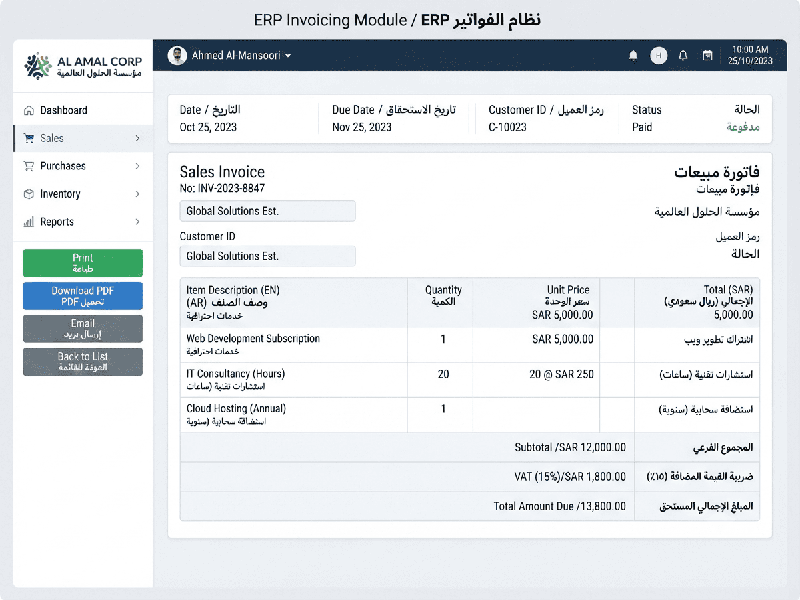
Arabic and English Bilingual Invoicing in ERP
Implementing Arabic and English bilingual invoicing
in an ERP requires more than translating static labels—it demands
dual-language master data, right-to-left (RTL) and bidirectional (BiDi) text
handling, proper font embedding, and alignment with local tax and e-invoicing
regulations.
1. Core Architecture & Master Data Design
An invoice template can only render data that exists
in a structured, reliable format. Avoid relying on ad-hoc machine translation
at print time.
Separate Language Fields: Maintain dedicated Arabic (_ar) and
English (_en) fields for customer/supplier legal names, addresses, item/service
descriptions, units of measure (e.g., Piece / قطعة), payment terms, and footers.
Language-Neutral Identifiers: Keep values such as tax
registration/VAT numbers, commercial registration numbers, SKUs, IBANs, phone
numbers, and email addresses in single, canonical fields.
Mandatory vs. Optional Rules: Define which language is mandatory
per field based on legal requirements (for example, Arabic legal names may be
mandatory for domestic/government submissions, while English is optional or
vice versa).
Fallback Behavior: Specify what prints if one language translation is
blank (e.g., fall back to the populated language rather than leaving a blank
gap or broken placeholder).
2. Layout, Typography & Bidirectional (BiDi) Rules
Arabic reads right-to-left (RTL) and uses cursive
contextual letter shaping (initial, medial, final, and isolated forms), while
English, numbers, and codes typically read left-to-right (LTR).
Bilingual Invoice Layout: Common patterns include stacked
headers/labels (English + Arabic in each cell/block) or mirrored
side-by-side blocks (Arabic aligned right, English aligned left). Ensure
line-item tables have clear column headers in both languages and sufficient
width/line-height so Arabic diacritics and longer legal names do not clip or
overlap.
Isolating Mixed Text & Numbers: Wrap alphanumeric codes, SKUs,
invoice numbers, email addresses, and numeric amounts inside directional
isolation markers so punctuation, currency symbols, and digits do not reverse
or jump inside Arabic strings.
Numerals & Dates: Standardize whether numeric amounts
use Western digits (0–9) or Arabic-Indic digits (٠–٩)—Western digits are widely
used in commercial/financial invoices across the Gulf, though regional
preferences vary. Store dates in a standard calendar/timestamp format in the
database and display Gregorian and/or Hijri dates as required.
Font Embedding in PDFs & Print Engines: Select an ERP reporting engine or
PDF generator with full Arabic shaping and BiDi support, and embed
Arabic-capable fonts (such as Cairo, Noto Sans Arabic, or Amiri)
so letters never render disconnected (ا ل ع ر ب ي ة) or as boxes (□□□) on client
devices or printers.
3. Regulatory, Tax & E-Invoicing Compliance
If you are issuing invoices in Arabic-speaking
jurisdictions (such as Saudi Arabia, the UAE, or other GCC/MENA markets),
invoicing formats must align with local tax and electronic invoicing mandates:
Structured Data vs. Visual PDF: Modern e-invoicing regimes rely on
structured machine-readable payloads (such as XML/UBL or PINT-aligned formats)
alongside human-readable PDF/visual representations. Ensure Arabic character
encoding (UTF-8) is preserved end-to-end across the ERP,
middleware/integration layer, and tax portal or accredited service provider.
Mandatory Invoice Elements: Verify with your tax/accounting
advisor that required fields—seller/buyer tax IDs, invoice date/time, VAT breakdown
per line and total, QR codes (where mandated), credit/debit note references,
and amounts in words—are present and accurate in both data and print views.